
This article was published in 2016. Platform features may have changed since then.
"The world's catalog of ideas," as Pinterest calls itself, reaches millions of users. Now access to the Pinterest website has been blocked. The site has been banned in Turkey, and users there cannot log in.
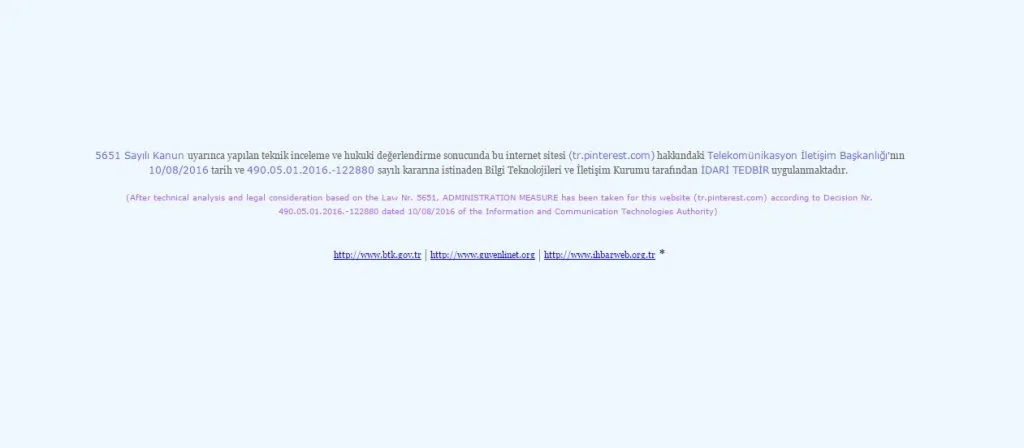
Access has been blocked to https://tr.pinterest.com, a platform with millions of users where people find recipes, parenting tips, style inspiration and other ideas to try, and save them for later. Pinterest won't open.
The block is causing problems for users of the photo-blog-style social media site. When you try to visit, you see a screen with the following notice: "Following a technical review and legal assessment under Law No. 5651 (Turkey's internet law), an administrative measure is being applied by the Information and Communication Technologies Authority (BTK), pursuant to the decision of the Telecommunications Communication Presidency dated 10/08/2016 and numbered 490.05.01.2016-122880." The screen also includes links to the BTK, Güvenlinet and İhbarweb sites.
The name combines the English words Pin and Interest. For this platform, we can borrow the phrase people use about television: "radio with pictures." Yes, this app is Twitter with pictures. That may be a bit superficial, but it works almost exactly like Twitter.
Pinterest with AI: the future of visual discovery
Pinterest is a platform where millions of people find inspiration, save ideas and get lost in visual worlds. So what can this visual discovery engine offer when it is combined with artificial intelligence (AI)? At Medyateji, we looked at how AI is transforming the Pinterest experience and how you can benefit from this potential. Click to read.
Update: The access ban was lifted after our article was published. If you still can't get in, please follow our latest articles. Your access problem may also be DNS-related. We have listed the steps you need to take below.
How to clear the DNS cache
1- On your computer, go to Start > Run, type cmd in the window that appears, and click OK. (Alternatively, you can press the Windows key + R.)
2- In the command prompt window that opens, type the following commands one at a time, pressing Enter after each one.
ipconfig /flushdns
ipconfig /release
ipconfig /renew
exit
After these steps, you will have successfully cleared the DNS cache. We recommend restarting your web browser and checking whether you can access the site.