
This article was published in 2017. Platform features may have changed since then.
Read our article to learn how to use the video feature in your Facebook page cover. With its latest update, Facebook has activated the option to upload video to page covers. You can now play a video in your Facebook page cover and make your content stand out.
Facebook continues to roll out improvements for page admins. As part of this, page covers can now carry video. With the videos you upload to your Facebook page cover, you can give your followers a different kind of presentation.
Medyateji, which works on social media consulting and media strategies for the digital world, has taken a close look at Facebook's latest move. The feature has not yet reached most Facebook Business users' pages, but it will soon be rolled out to all pages. It is not known whether Facebook requires a minimum number of page likes for video playback to work.
News on Facebook's new feature for businesses
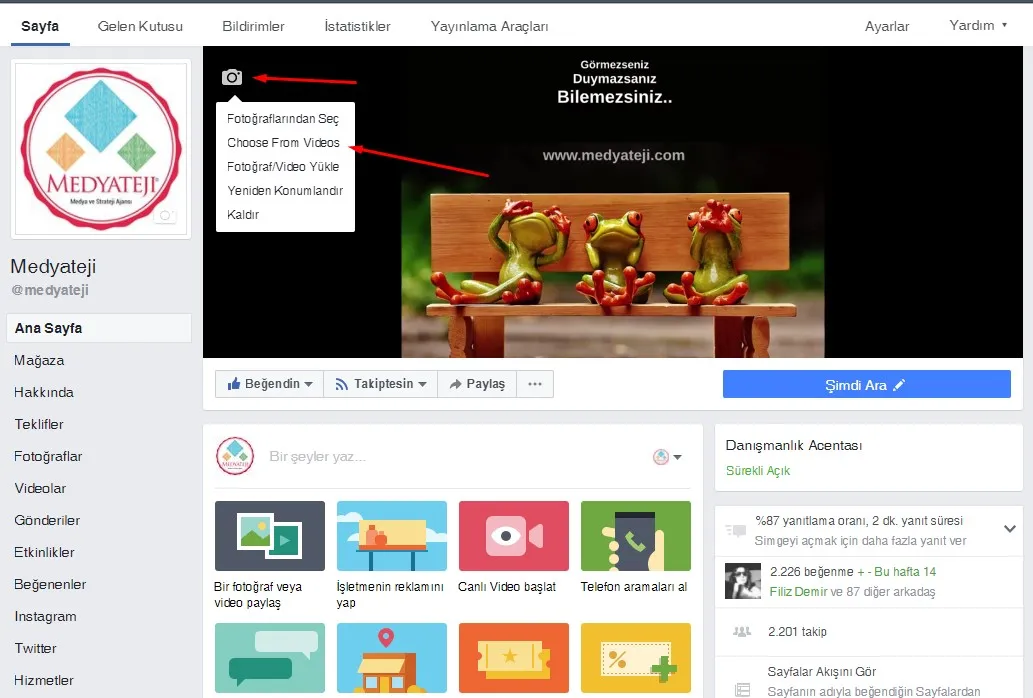
ABOUT THE FACEBOOK COVER VIDEO
With the Facebook update, you can select the Choose From Videos option to use an existing video, or click the Upload Video button to add a newly created one to your page. You can also reposition uploaded videos to fit the cover.
At Medyateji, we use the cover video feature to highlight brand-specific daily announcements, to deliver an eye-catching message to followers, or, on a weekend, to add the sound of the sea and waves as a relaxing page message.
If you have any trouble using this feature, you can ask our live support operators by calling 0850 302 6 456 or via medyateji.com.